Appcircle MCP Server
The Appcircle MCP Server exposes Appcircle platform capabilities through the Model Context Protocol (MCP), enabling AI assistants and development tools to interact with your Appcircle organization, builds, and workflows directly from your IDE or CLI.
The Model Context Protocol is an open protocol that lets AI models securely connect to external tools and data sources. The Appcircle MCP server allows AI tools to connect Appcircle resources.

How MCP works
The Appcircle MCP Server acts as a bridge between MCP-capable clients (such as Claude Applications, Codex, Cursor, or VS Code) and the Appcircle platform. Your AI assistant sends requests through the client; the client talks to the MCP server; the server calls Appcircle's APIs and returns structured data. This lets you query builds, profiles, signing identities, distribution status, publish status, and reports using natural language or tool call.
Use cases
- CI/CD and workflow intelligence: Monitor pipeline runs, track release status, and get insights into your mobile CI/CD workflows.
- Configuration and environment insights: Query build configurations and signing setup to understand how a project is configured and where issues may originate.
- Reporting and operational insights: Generate summaries of CI stability, recurring issues, pipeline performance, and overall CI/CD health and more.
Toolsets
The server exposes the following toolsets. Each toolset groups related tools (for example, listing build profiles, getting workflow details, or fetching reports).
| Toolset | Description |
|---|---|
build_module | Build profiles, configurations, workflows, commits, and pipeline operations |
signing_identities | Signing Identities: certificates, bundle identifiers, keystores |
testing_distribution | Testing distribution profiles and distribution details |
publish_to_stores | Publish profiles and store publishing operations |
enterprise_app_store | Enterprise app store profiles and store details |
report | Reporting: build history, build insights, distribution, signing, publish status, and related reports |
You can exclude one or more toolsets when running the server (via environment variable or CLI) so that only the tools you need are exposed. See how you can exclude toolsets.
Running modes
Choose how the MCP server runs based on whether you want to install anything locally.
| Mode | Summary |
|---|---|
| Remote host | Connect to https://mcp.appcircle.io. No local install; your client sends your Appcircle Access Token on each request. |
| Local (stdio) | Run the server from source (requires Python and pip) and let your MCP client start it as a subprocess. Set APPCIRCLE_ACCESS_TOKEN in the environment. |
| Local (streamable-http) | Run the server locally over HTTP and have your client connect to that URL, sending its token with each request. |
| Local (Docker) | Run the official Docker image on your machine. Requires Docker. |
For most users, connecting to the remote host is the fastest way to get started because it needs no local setup. See the installation guides for the exact configuration for each mode and client.
Tools
Build
| Tool | Description | Access level |
|---|---|---|
get_build_profiles | List build profiles for the current organization (paginated), excluding sensitive profile keys. | Read |
get_build_profile_details | Get details for a single build profile, optionally including its build configurations. | Read |
get_build_configuration_details | Get details for a single build configuration under a given build profile. | Read |
get_build_profile_workflows | List workflows associated with a build profile. | Read |
get_workflow_detail | Get details and YAML definition for a single workflow in a build profile. | Read |
get_commits_by_branch | List commits for a build branch, with optional pagination metadata. | Read |
get_commit_details | Get detailed information for a single commit by ID or commit hash. | Read |
get_last_commit | Get the most recent commit on a build branch. | Read |
get_build_status | Get the status of a build (for example success, failed, canceled, running). | Read |
get_build_logs | Get the logs for a build, optionally scoped to a single step, with tail truncation to avoid flooding the AI assistant's context. | Read |
get_variable_groups | List the organization's build environment variable groups and their variables (secret values are redacted). | Read |
trigger_build | Start a new build on a branch or for a specific commit. Queues a real build and consumes a build credit. | Write |
cancel_build | Cancel a queued or running build. In-progress work is stopped and cannot be resumed. | Write |
Signing Identities
| Tool | Description | Access level |
|---|---|---|
get_bundle_identifiers | List bundle identifiers (iOS/macOS app bundle IDs) registered in Appcircle. | Read |
get_certificates | List signing certificates for the organization, omitting sensitive fields. | Read |
get_keystores | List keystores (e.g. Android signing keystores), omitting sensitive fields. | Read |
get_provisioning_profiles | List provisioning profiles, optionally filtered by app/bundle ID, omitting sensitive fields. | Read |
Testing Distribution
| Tool | Description | Access level |
|---|---|---|
get_distribution_profiles | List testing distribution profiles for the current organization (paginated), omitting sensitive settings. | Read |
get_distribution_profile_details | Get details for a single distribution profile, including paginated app versions, omitting sensitive settings. | Read |
get_testing_groups | List testing distribution groups for the organization, including each group's tester emails and group type. | Read |
update_app_version_release_notes | Overwrite the release notes shown to testers for a distribution app version. | Write |
send_app_version_to_testers | Notify testers or a testing group about a distribution app version. Dispatches a real notification. | Write |
Publish to Stores
| Tool | Description | Access level |
|---|---|---|
get_publish_profiles | List publish profiles for a given platform (iOS/Android), with pagination and optional flow-status filtering. | Read |
get_publish_profile_details | Get details for a single publish profile (iOS/Android), including paginated app versions, omitting certificate thumbprints. | Read |
get_app_version_metadata | Get store listing metadata for a single app version (app review information, localizations, release information). | Read |
get_metadata_locales | List the available store metadata locales for a single app version. | Read |
get_intune_metadata | Get Microsoft Intune app metadata for a single app version. | Read |
get_publish_metadata_lock_status | Check whether a publish profile's store metadata is locked for editing. | Read |
get_publish_details | Get the publish flow run details for a single app version, including ordered steps and run history. | Read |
get_publish_step_logs | Get the logs for a publish flow run, optionally scoped to a single step, with tail truncation. | Read |
get_publish_flows | Get the publish flows configured for a publish profile. | Read |
start_publish | Start (or restart from a specific step) a publish flow run. Performs real publishing work, such as uploading to the App Store, Play Store, or Intune. | Write |
stop_publish | Cancel a running publish flow run. In-progress work is stopped and cannot be resumed. | Write |
Enterprise App Store
| Tool | Description | Access level |
|---|---|---|
get_store_profiles | List enterprise app store profiles for the current organization (paginated). | Read |
get_store_profile_details | Get details for a single enterprise app store profile, including paginated app versions, omitting certificate thumbprints. | Read |
Report
| Tool | Description | Access level |
|---|---|---|
get_build_history_report | Get build history report with pagination and optional filters (date range, build profile, organization). | Read |
get_build_queue_waiting_report | Get the build queue waiting report with pagination and optional date range filters. | Read |
get_build_activity_log | Get the build activity log (workflow and profile changes, CodePush releases, and more) with pagination and filters. | Read |
get_build_insights_report | Get an aggregated Build Insights Report over build history: health snapshot and trends, root cause, artifact health, workflow quality, queue time, and maturity assessment. Defaults to the last 30 days; supports optional date range, section filtering, and sub-organization scope. See Build Insights for the full metric reference. | Read |
get_signing_report | Get signing report with pagination and optional filters (date range, organization, OS, build status). | Read |
get_signing_activity_log | Get the signing activity log (certificate, provisioning profile, and keystore expiry notices) with pagination and filters. | Read |
get_distribution_app_version_report | Get daily usage report for distributed app versions with pagination and filters (date range, profile, OS, organization). | Read |
get_distribution_sent_report | Get daily usage report for distributed app sharing with pagination and filters (date range, profile, OS, organization). | Read |
get_enterprise_app_store_app_usage_report | Get app usage report for the enterprise app store with pagination and optional organization filter. | Read |
get_publish_status_report | Get publish status report with pagination and optional filters (date range, app name, organization, status). | Read |
get_publish_resign_report | Get publish resign report with pagination and optional filters (date range, app name, organization, status). | Read |
get_publish_activity_log | Get the publish activity log (re-sign events, publish flow events, and more) with pagination and filters. | Read |
Supported Clients
The Appcircle MCP Server works with any MCP-capable client. Installation and client-specific setup (including how to add the server and configure your token) are documented in the Installation Guides.
- Claude Applications (Claude Desktop, Claude Code)
- Cursor IDE
- Codex (App and CLI)
- Antigravity IDE
- VS Code (GitHub Copilot)
- Windsurf IDE
- Gemini CLI
- GitHub Copilot CLI
Follow the guide for your client to install or connect to the Appcircle MCP Server and to set your Appcircle access token.
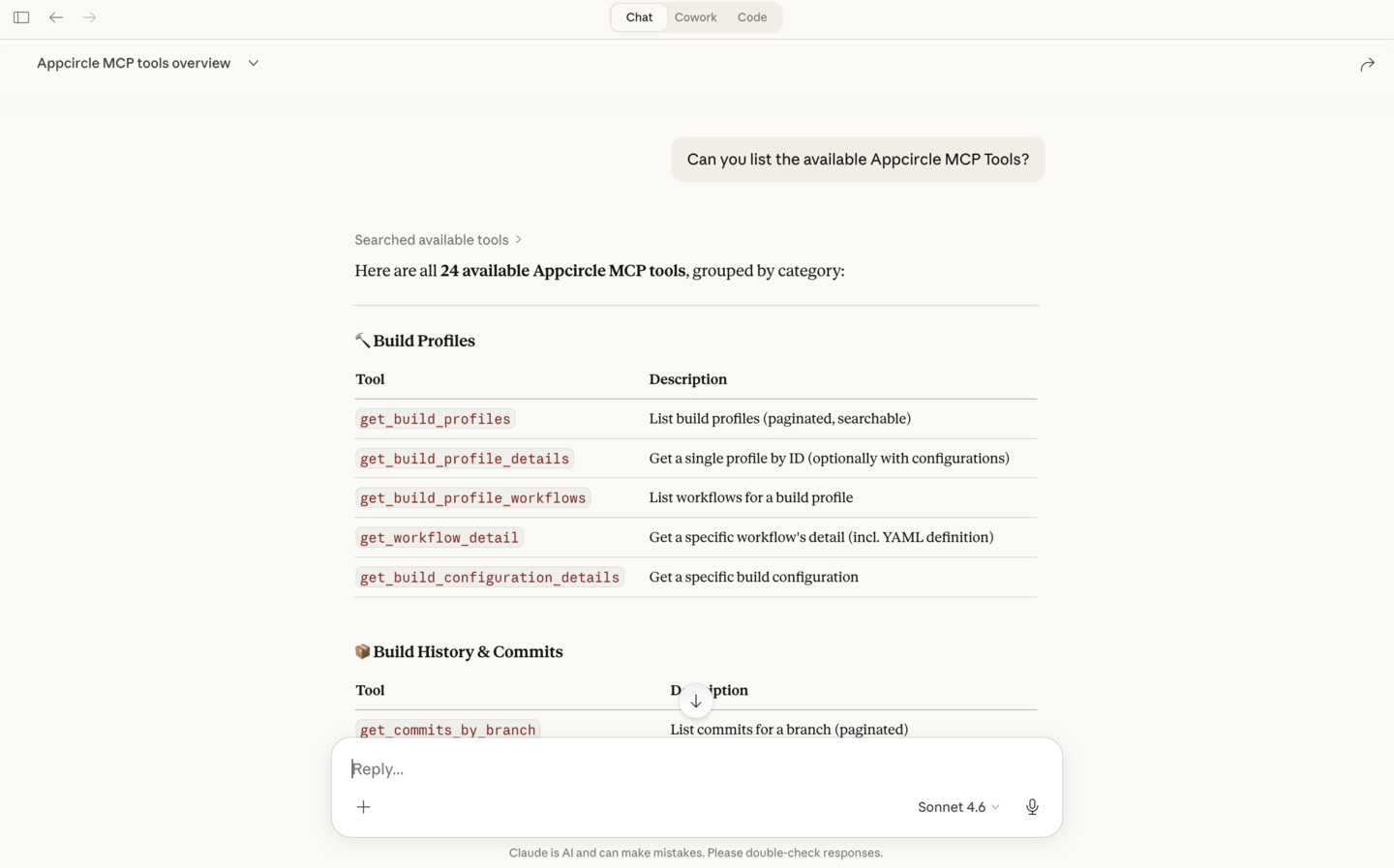
You can see the available tools in your MCP client after the Appcircle MCP server is configured. The client lists the tools the server provides; you or the AI can then call them to fetch Build profiles, distribution details, reports, and more.
Authentication
To use the Appcircle MCP Server, you need an Appcircle Access Token. This token authenticates requests to Appcircle's APIs and is required for all running modes (stdio, streamable-http, or when connecting to the remote host at https://mcp.appcircle.io).
There are two ways to obtain an access token. For step-by-step instructions on creating and exchanging credentials for a token:
- Personal Access Key: Best for individual use; inherits your user permissions in the organization.
- API Keys: Best for automation and CI; scoped by organization and roles.
Both produce an access token that you use as APPCIRCLE_ACCESS_TOKEN in your environment or pass via your MCP client (for example, Authorization: Bearer <token>).
When creating the token (either method), restrict write access if you only need read-only MCP usage. For example, listing Build profiles, Distribution profiles, or Reports. Grant write permissions only when you want the AI or your client to trigger builds, notify testers, publish to stores, or change settings. For API Keys, use Viewer (or read-only) roles for the relevant modules. For Personal Access Key, your user role in the organization applies; use an account or role with read-only access if you do not need write operations.
If you run the server locally, you can also disable write tools at the server level regardless of the token's permissions by setting AC_MCP_ENABLE_WRITE_TOOLS=false in the server environment. This prevents write tools such as trigger_build and start_publish from being registered at all.
FAQ
Do I need write access to use the Appcircle MCP?
No. Read-only access is enough for listing builds, profiles, and reports. Grant write access only if you want the AI or your client to trigger builds, notify testers, publish to stores, or change settings. When creating an API Key, use Viewer (or read-only) roles for the relevant modules. When using a Personal Access Key, your user role in the organization applies. If you run the server locally, you can also set AC_MCP_ENABLE_WRITE_TOOLS=false to stop write tools from being registered, regardless of the token's permissions.
Do I need to install the Appcircle MCP server locally?
No. You can connect to the remote host at https://mcp.appcircle.io and send your Appcircle token with each request; no local install is required. If you prefer to run the server locally (stdio, streamable-http, or Docker), see Running modes and the documentation for client configuration.
Is the Appcircle MCP server available in public registries?
Yes. The Appcircle MCP server is listed in public MCP directories, including:
- Official MCP Registry (search for Appcircle)
- Community-driven registry (mcpservers.org)
Where do I find installation steps for my Appcircle MCP client?
Client-specific installation and setup guides are in the Installation Guides. Follow the guide for your client (Claude, Cursor, Codex, VS Code, etc.) to add the Appcircle MCP Server and configure your token.